





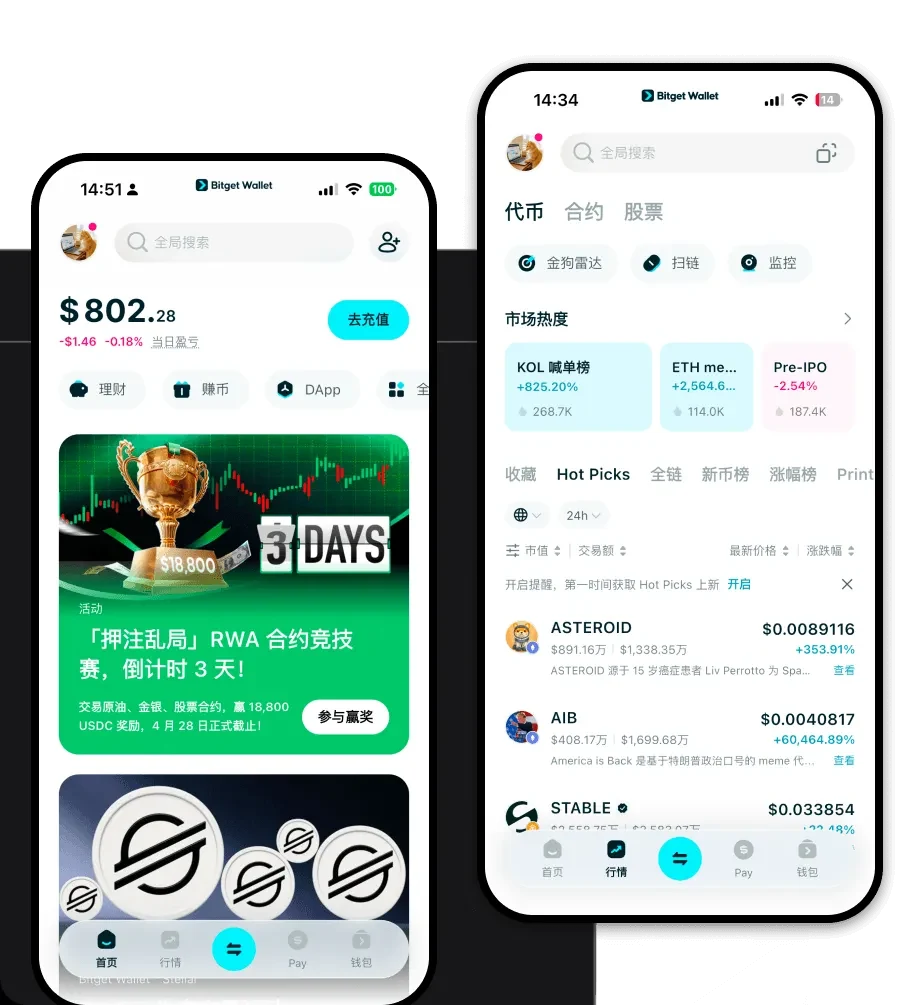
1. What is a Cyberhella Wallet?
A Cyberhella wallet is a digital interface that allows you to store, manage, and interact with your Cyberhella tokens on the blockchain. Because Cyberhella operates on the EVM (Ethereum Virtual Machine) ecosystem, it requires a wallet that is fully compatible with Ethereum-based standards. This ensures that your tokens are recognized, transferable, and capable of interacting with various decentralized protocols.
Cyberhella is a digital asset supported by the Bitget Wallet ecosystem, designed for users seeking a secure and reliable platform for managing their crypto assets within the Web3 space. Bitget Wallet provides seamless access for exploring decentralized applications and managing tokens like Cyberhella with trusted security.
2. Download Bitget Cyberhella Wallet
Getting started with your Cyberhella journey requires a reliable and versatile gateway. Bitget Wallet serves as an all-in-one hub for your digital assets, offering a seamless experience whether you are a beginner or a power user. By choosing to download Bitget Wallet, you gain access to a platform that prioritizes user sovereignty through non-custodial storage, meaning you hold the private keys to your own assets.
Bitget Wallet is built for flexibility, supporting over 130 mainnet blockchains and providing a unified interface across iOS, Android, and browser extensions. This multi-chain support ensures that you can manage Cyberhella alongside other assets without switching applications. The installation is straightforward: simply download the application from the official site, secure your recovery phrase, and you are ready to import or create your Cyberhella wallet address.
3. Why Choose Bitget Cyberhella Wallet?
Selecting the right wallet for a meme coin like Cyberhella is critical. Bitget Wallet is optimized for the EVM ecosystem, making it an ideal choice for high-frequency trading and community-driven assets. Here is why it stands out:
- Native EVM Compatibility: Perfectly synced with Ethereum-based networks, allowing you to interact with Cyberhella smart contracts without compatibility issues.
- Advanced DeFi Aggregation: Access deep liquidity pools directly within the wallet, ensuring that you can trade Cyberhella with minimal slippage.
- Meme Coin Ecosystem Tools: Specialized features designed for tracking market sentiment and rapid token discovery within the meme coin space.
- Robust Security Architecture: Backed by a $300 million user protection fund, Bitget Wallet provides enterprise-grade security for your non-custodial assets.
- Seamless Cross-Platform Access: Whether you are mobile-first or prefer desktop trading, your wallet state remains synchronized across all your devices.
4. How to Create a Cyberhella Wallet
Setting up your wallet is the first step toward full control over your Cyberhella holdings. Follow these steps to get started:
- Download and Install: Visit the official Bitget Wallet website and download the app version compatible with your device (iOS, Android, or Browser Extension).
- Initialize Wallet: Open the app and select 'Create Wallet.' You will be prompted to set a strong password to protect your local device access.
- Secure Your Seed Phrase: The app will generate a 12-word recovery phrase. Write this down on paper and store it offline; never share this with anyone, as it is the only way to recover your funds.
- Add Cyberhella: Since Cyberhella is an EVM token, it may be automatically detected. If not, use the 'Add Token' feature and paste the official Cyberhella contract address to view your balance.
- Verify Address: Your wallet will generate a unique Cyberhella wallet address (starting with '0x'). Use this address to receive tokens from exchanges or other users.
5. What Can You Do With a Cyberhella Wallet?
Owning Cyberhella in a non-custodial wallet unlocks the full potential of the Web3 experience. Here are the primary ways to utilize your assets:
- Trading on Decentralized Exchanges: Use the built-in DApp browser in Bitget Wallet to connect to DEXs like Uniswap or SushiSwap, allowing you to swap Cyberhella directly from your wallet for other tokens.
- Holding in Non-Custodial Wallets: Keep your Cyberhella safe under your own control, ensuring that only you have access to your funds, rather than leaving them on a centralized exchange.
- Portfolio Diversification: Manage Cyberhella alongside your broader crypto portfolio, using the wallet's multi-chain interface to track performance across different tokens and networks.
- Participating in Community Governance: Engage with the Cyberhella community by participating in governance votes or staking programs that require holding the token in a self-custody wallet.
6. How Cyberhella Wallets Are Different from Other Crypto Wallets
Not all wallets are created equal, especially when dealing with EVM-based meme tokens. Because Cyberhella exists within the EVM environment, your wallet functions differently compared to non-EVM wallets like those for Bitcoin or Solana.
Unlike Bitcoin wallets that utilize the UTXO (Unspent Transaction Output) model, your Cyberhella wallet relies on an Account-Based model. This means your wallet functions like a bank account balance rather than a collection of transaction inputs. Furthermore, managing Cyberhella requires paying gas fees in the native chain's coin (e.g., ETH or BNB) to process transactions. Bitget Wallet simplifies this by offering smart gas fee estimation, helping you avoid overpaying during network congestion, and ensuring your transactions are processed efficiently compared to basic, non-optimized wallets.
