


Cash Out USDT: How to Withdraw USDT to Bank Account?
Key Takeaways
-
You can cash out USDT in Bitget Wallet by selling it for fiat currency and choosing an available payout method.
-
Select the USDT network that matches your wallet balance, then review the estimated fiat payout before you confirm.
-
Eligible USD, EUR, and GBP payouts may support bank transfer. Other available options can include credit/debit card, PayPal, Venmo, and MoonPay Balance.
-
MoonPay verification may be required before a payout is processed. The app shows the transaction limits and available options before you submit the order.
Cashing out USDT means converting your USDT balance into fiat currency, such as USD, EUR, GBP, or ZAR. That fiat value can then be paid out through a bank transfer, card, or payment service, depending on the options available for your transaction.
In Bitget Wallet, this process starts in Home → More → Sell Crypto. The Sell Crypto flow is powered by MoonPay, which processes the crypto-to-fiat transaction and presents the payout methods available to you.
How Do You Withdraw USDT With Bitget Wallet?
To withdraw USDT from your wallet, select USDT in Sell Crypto, choose the matching network, enter an amount, select fiat and a payout method, then submit the order.
The flow is designed to show the key details before confirmation, including the amount of USDT you are selling, the estimated fiat payout, transaction limits, and available payout methods.
Step 1: Select USDT and the Network Where It Is Held
Start in Bitget Wallet → Home → More → Sell Crypto, then select USDT.
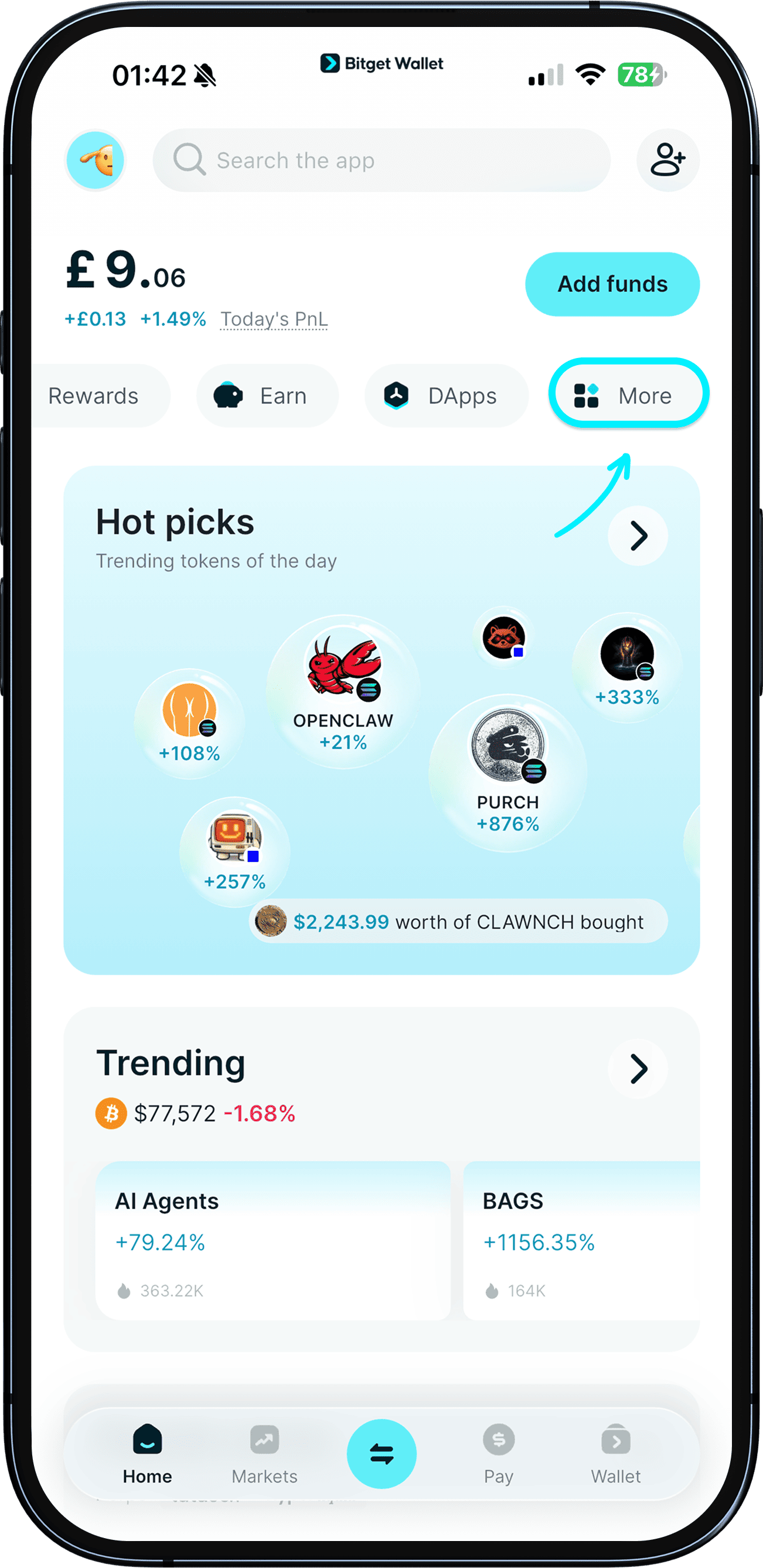
Next, select the blockchain network where your USDT balance is held. Bitget Wallet currently supports selling USDT on:
-
BNB Chain
-
Ethereum
-
Solana
-
Tron
-
Polygon
-
Arbitrum
The network in Sell Crypto must match the network shown for your USDT balance. For example, choose Tron for TRC20 USDT and Ethereum for ERC20 USDT.
| If you hold |
Select in Sell Crypto |
| TRC20 USDT |
Tron |
| ERC20 USDT |
Ethereum |
| USDT on BNB Smart Chain |
BNB Chain |
| USDT on Solana |
Solana |
| USDT on Polygon |
Polygon |
| USDT on Arbitrum |
Arbitrum |
Take a moment to check this selection before continuing. USDT exists on several networks, and a network mismatch can cause a transaction to fail.
Step 2: Enter the Amount and Choose Your Fiat Currency
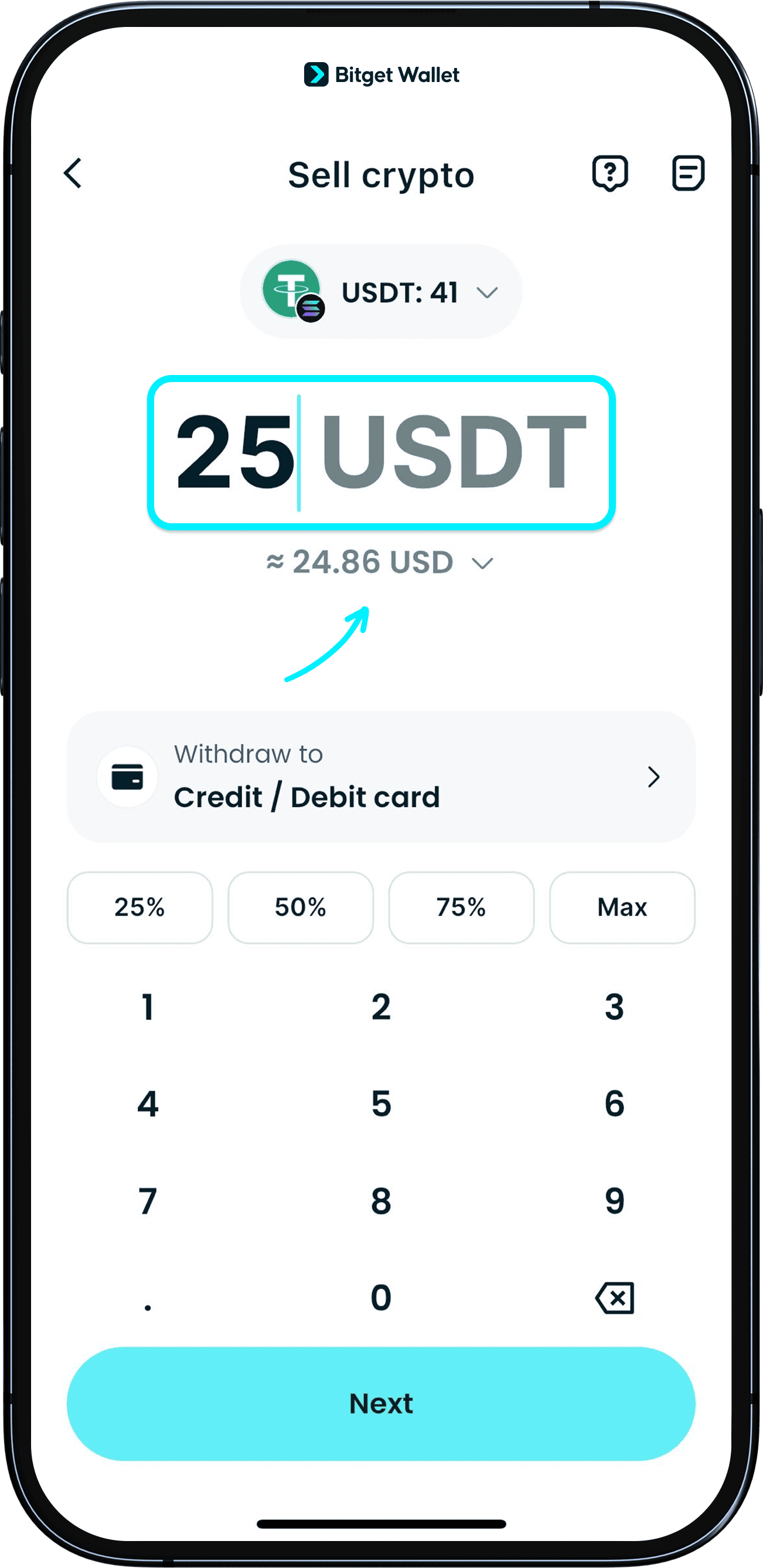
Enter the amount of USDT you want to sell, then choose the fiat currency you want to receive.
The Sell Crypto flow shows the available minimum and maximum amount for the transaction, along with an estimated fiat payout. These limits can vary based on the asset, network, fiat currency, payout method, verification status, and provider requirements.
The quote is an estimate until you confirm. If the market rate, network conditions, or transaction details change, the final fiat amount may also change.
Step 3: Choose a Payout Method
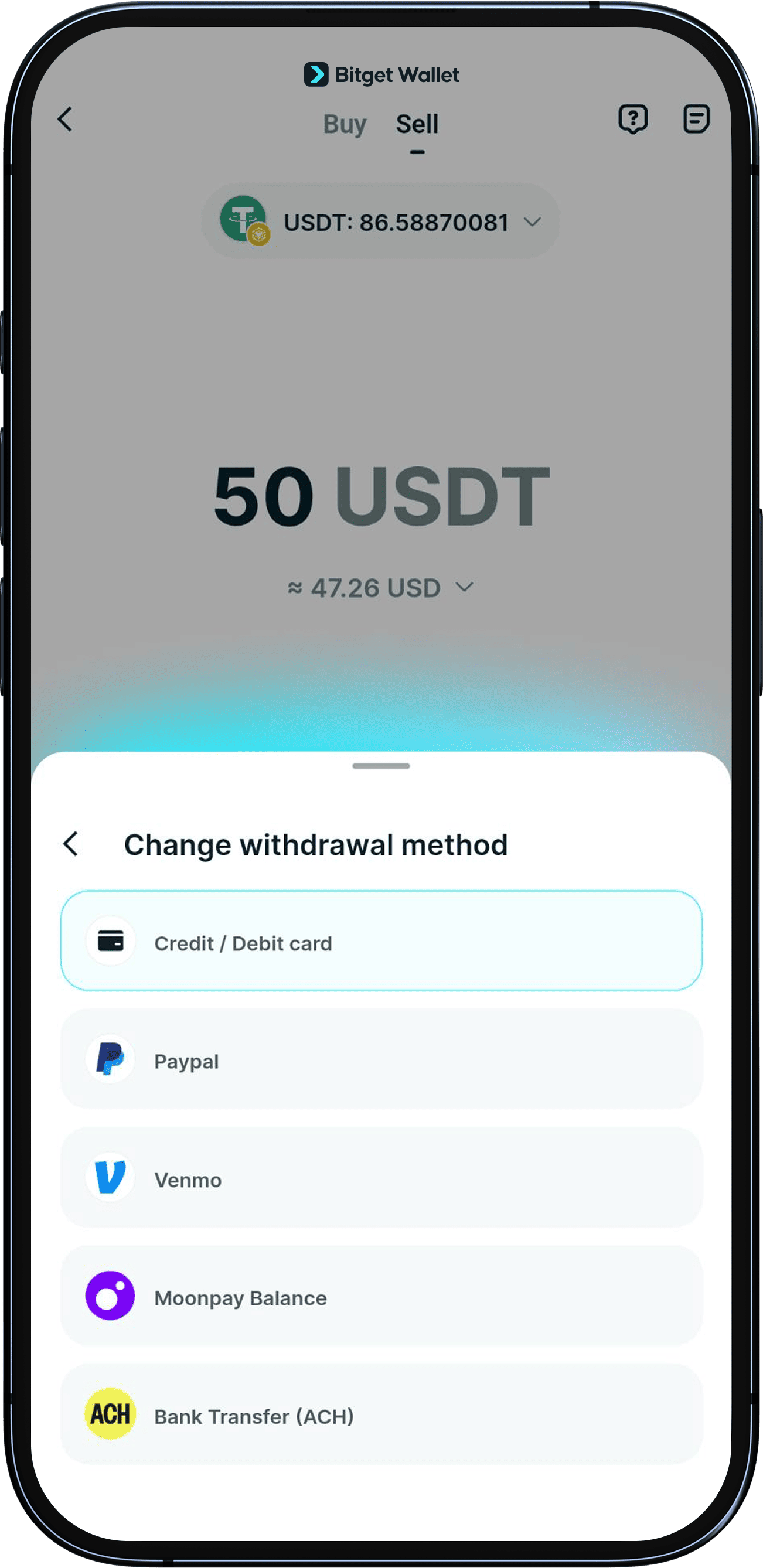
Choose from the payout methods shown for your transaction.
Depending on your fiat currency, location, and transaction details, available options may include:
-
Credit or debit card
-
PayPal
-
Venmo
-
MoonPay Balance
-
Bank transfer
The payout options shown in the app are the options available for that specific order. A payment method may not be available in every country or for every fiat currency.
Step 4: Complete MoonPay Verification if Requested
Complete MoonPay verification if it is required for your transaction.
If you are using MoonPay for the first time, you may need to register and provide:
-
Personal details
-
A government-issued ID
-
A face scan or selfie verification
-
Details for your selected payout method
Identity verification is part of the crypto-to-fiat process and may take longer if the documents are unclear or further checks are required.
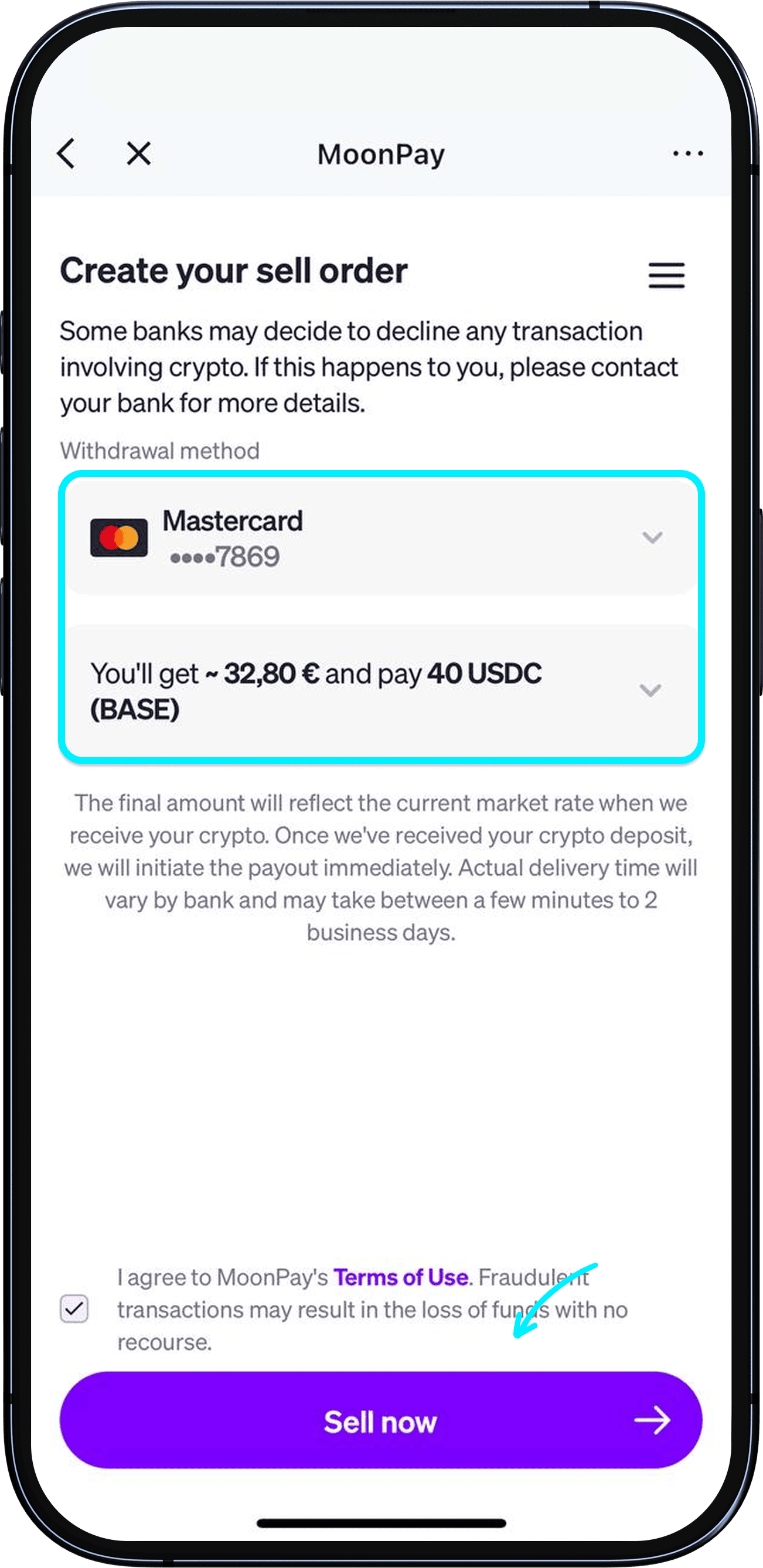
Step 5: Review the Quote and Submit the Order
Tap Next to open the MoonPay transaction page, where you can review the order before it is submitted.
Check the following details:
-
Amount of USDT being sold
-
Selected USDT network
-
Fiat currency
-
Estimated fiat payout
-
Payout method
-
Fees or exchange-rate details shown in the quote
Once you confirm the details on the MoonPay page, return to Bitget Wallet and tap Withdraw now to submit the order.
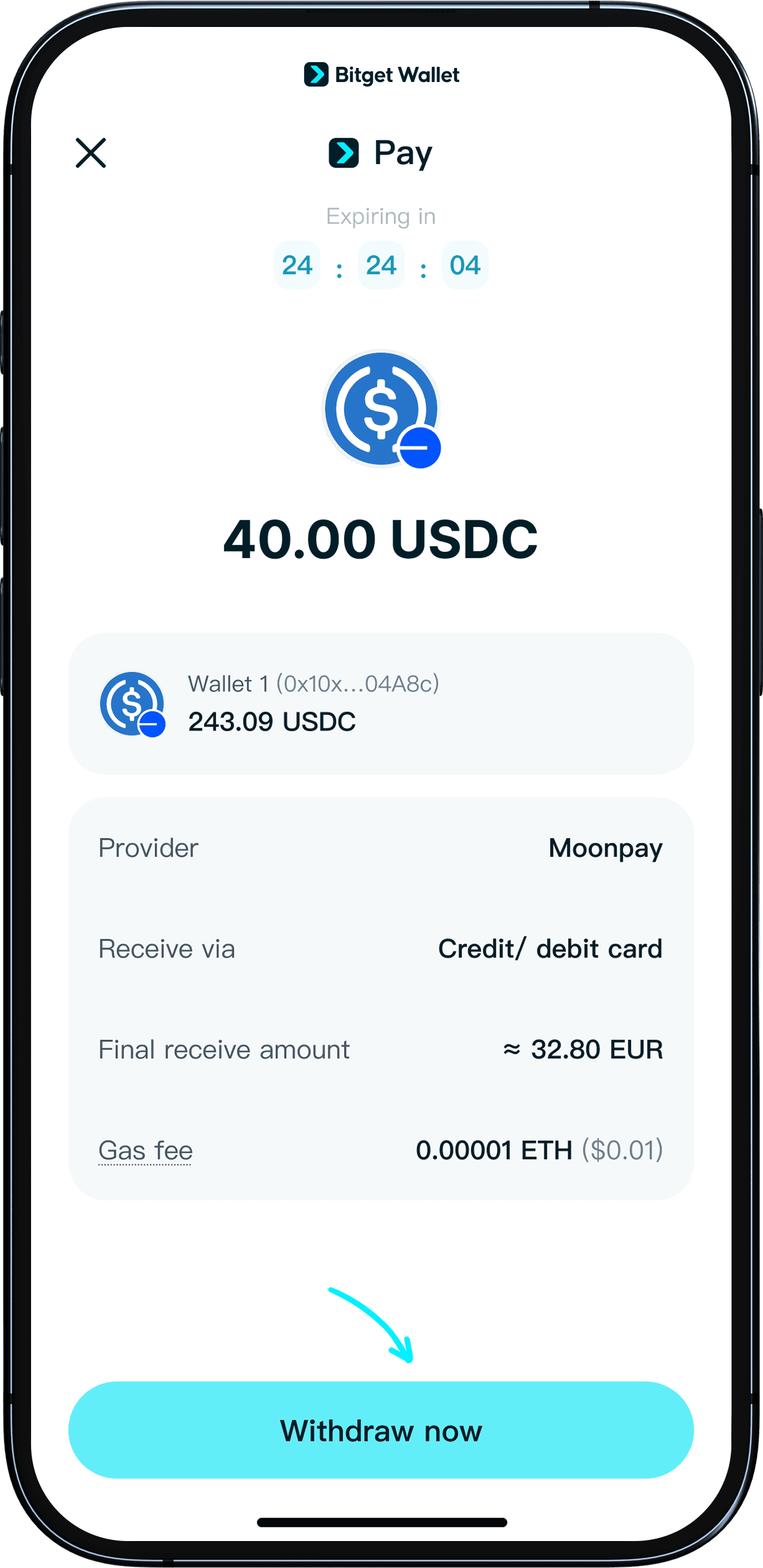
Ready to cash out USDT? Open Bitget Wallet and go to Home → More → Sell Crypto to view the fiat currencies and payout methods available for your transaction.
Can You Send USDT Directly to a Bank Account?
No. USDT cannot be deposited directly into a traditional bank account because it is a token held on a blockchain.
A bank account receives fiat currency through banking or payment systems. To receive money from USDT, you first sell the USDT for fiat, then select the available payout method for that fiat amount.
This conversion from crypto to fiat is often called a crypto off-ramp. In the Bitget Wallet Sell Crypto flow, MoonPay handles the conversion and payout process.
Which Fiat Currencies Can You Receive When Selling USDT?
Bitget Wallet currently supports 25 fiat currencies for eligible Sell Crypto transactions.
| Region |
Supported fiat currencies |
| Americas |
USD, BRL, DOP, MXN, PEN |
| Europe |
EUR, GBP, CHF, CZK, DKK, NOK, PLN, RON, SEK |
| Asia-Pacific |
AUD, IDR, NZD, THB |
| Middle East and Africa |
EGP, ILS, KES, KWD, OMR, TRY, ZAR |
For example, if you want to convert USDT to South African rand, select ZAR when it appears in the Sell Crypto flow. You will then see an estimated ZAR payout before you continue.
Supported fiat currencies do not guarantee the same payout methods in every market. Your available options can depend on your location, selected currency, transaction amount, verification status, and provider availability.
Which Bank Transfer Methods Are Available for USDT Withdrawals?
Bank transfer may be available for eligible USD, EUR, and GBP payouts.
| Fiat currency |
Available bank transfer method |
| USD |
ACH |
| EUR |
SEPA |
| GBP |
UK Faster Payments |
For other supported fiat currencies, you may see a card payout, PayPal, Venmo, MoonPay Balance, or another option shown in the transaction flow.
If you specifically want to withdraw USDT to a bank account, select USD, EUR, or GBP where eligible and check whether bank transfer appears as an available payout method before confirming.
How Do You Withdraw TRC20 USDT to a Bank Account?
To withdraw TRC20 USDT, select Tron as the network in the Sell Crypto flow.
TRC20 USDT is USDT issued on the Tron blockchain. You do not need to convert it to ERC20 USDT first if the Tron option is available in Sell Crypto.
The steps are the same as for any other supported USDT network:
-
Open Home → More → Sell Crypto.
-
Select USDT.
-
Choose Tron.
-
Enter the amount to sell.
-
Choose your fiat currency and available payout method.
-
Review the MoonPay quote.
-
Return to Bitget Wallet and tap Withdraw now.
Do not select Ethereum, Solana, Polygon, Arbitrum, or BNB Chain if your USDT is held on Tron.
How Long Does It Take to Cash Out USDT?
Many USDT withdrawals are completed within minutes, but some payouts can take up to 1–3 business days.
The timing depends on several parts of the transaction, including:
-
MoonPay verification status
-
The payout method selected
-
Blockchain network processing
-
Bank, card, or payment-service processing times
-
Weekends and public holidays
-
Additional transaction or compliance reviews
A card or digital payment payout may be processed differently from a bank transfer. If the transaction is still pending, check its status in Bitget Wallet and in the payout account or payment service you selected.
How Do You Check the Status of a USDT Withdrawal?
You can track a submitted order in Bitget Wallet’s Sell Crypto history.
-
Open Home → More → Sell Crypto.
-
Tap the History icon.
-
Select the transaction to view its status and details.
You can also check the destination you chose for the payout, such as your bank account, card, PayPal account, Venmo account, or MoonPay Balance.
What Fees Apply When You Sell USDT?
The final amount you receive can include network fees, conversion costs, and payout-related charges.
Depending on the transaction, the quote may reflect:
-
Blockchain network fees
-
Provider fees
-
Currency conversion costs
-
Exchange-rate spreads
-
Payout-method charges
Fees can vary by network, fiat currency, payout method, and market conditions. For example, network costs on Ethereum can differ from costs on Tron, Solana, Polygon, Arbitrum, or BNB Chain.
The most useful number to check is the estimated fiat payout shown before confirmation. That amount reflects the details of your specific transaction at that time.
What Should You Do if Your USDT Withdrawal Is Delayed or Fails?
Start by checking the transaction status in Home → More → Sell Crypto → History.
A delay does not always mean the transaction has failed. It may be waiting for identity verification, provider processing, a bank or card review, or settlement through the selected payout method.
Why Did My Card Payout Fail?
A card payout may fail if the card does not support the service, the details are incorrect, or the card issuer declines the transaction.
Check that the card details are correct. If another eligible card is available, you can try that option instead.
Why Is My MoonPay Verification Not Working?
MoonPay verification can be delayed if an ID image is unclear, your internet connection is unstable, or the personal information entered does not match your identification.
Try uploading a clearer document photo, use good lighting for the face scan, and check your connection. If you still need support, contact MoonPay Support with your order ID and MoonPay-registered email address.
Why Has My Fiat Payout Not Arrived?
Fiat payouts may take longer because of bank processing, card issuer checks, weekends, public holidays, or transaction reviews.
Check the status in Bitget Wallet first, then check the card, bank account, or payment service chosen for the payout.
Can You Sell Other Crypto Assets in Bitget Wallet?
Yes. Bitget Wallet also supports selling selected assets beyond USDT, including USDC, ETH, SOL, BNB, TRX, and TON.
Available assets, supported networks, fiat currencies, transaction limits, and payout methods may vary. Open Home → More → Sell Crypto to see the options currently available in your wallet.
FAQ
Can I withdraw my USDT to my bank account?
Yes, after selling USDT for fiat currency. Eligible USD, EUR, and GBP transactions may offer bank transfer through ACH, SEPA, or UK Faster Payments.
How can I cash out my USDT?
Open Home → More → Sell Crypto in Bitget Wallet, select USDT and the correct network, enter the amount, choose fiat, then select an available payout method.
How do I withdraw USDT from my wallet?
Use the Sell Crypto feature in Bitget Wallet. Select the USDT balance you want to sell, choose the matching network, then follow the transaction flow to receive fiat.
How do I receive money from USDT?
Sell USDT for fiat currency and choose an available payout method. Depending on your transaction, this may include a card, PayPal, Venmo, MoonPay Balance, or an eligible bank transfer.
How do I withdraw TRC20 USDT to a bank account?
Select USDT in Sell Crypto and choose Tron as the network. Then enter the amount, select your fiat currency and payout method, review the quote, and submit the withdrawal.
Ready to Cash Out USDT?
Open Bitget Wallet and go to Home → More → Sell Crypto to check your available transaction limits, estimated fiat payout, and payout methods.
New to Bitget Wallet? Download Bitget Wallet to manage crypto across supported networks and access Buy, Swap, and Sell Crypto features.
Risk Disclosure
Cryptocurrency trading involves high market risk. Bitget Wallet is not responsible for any trading losses incurred. Always do your own research and trade responsibly.

 How to Buy USDAI in 2026: A Beginner’s Step-by-Step Guide to USD.ai2026-04-23 | 5 mins
- Cash Out USDC: How to Withdraw USDC to Bank Account?2026-03-03 | 5mins



